
FAQ
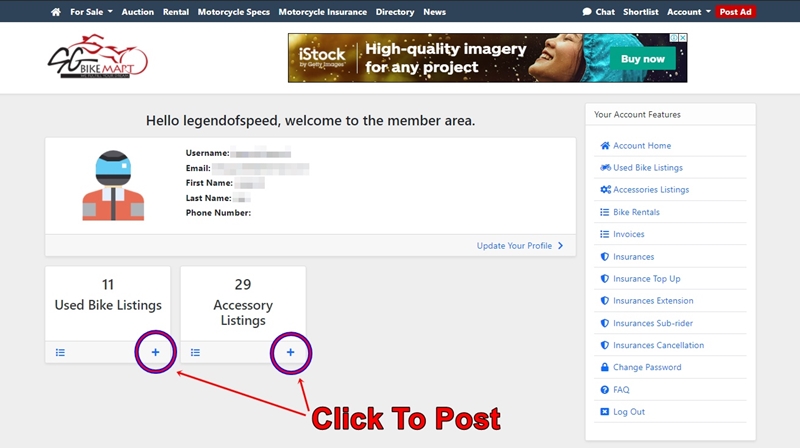
For Desktop, Click on the "+" to create an AD
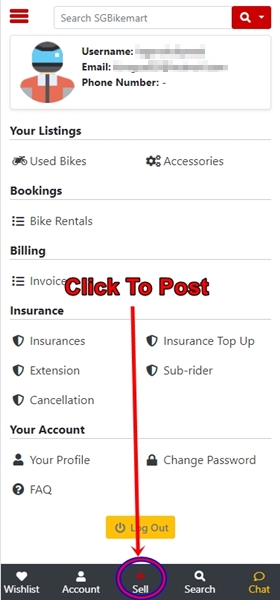
For App Or Mobile, Click on the "+" to create an AD
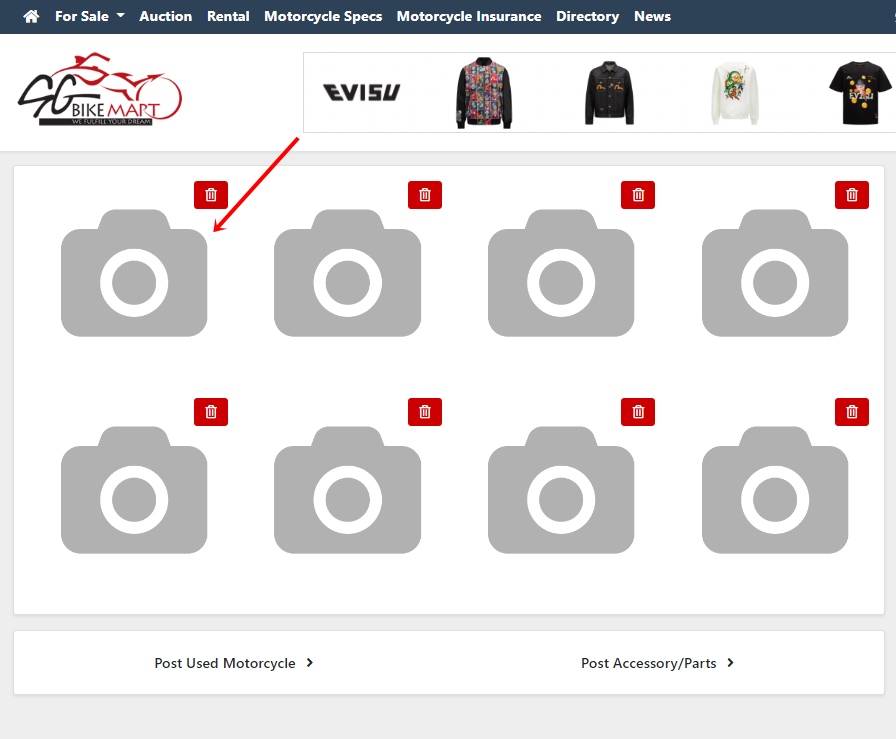
Just click on the camera and select your photos you wish to upload.
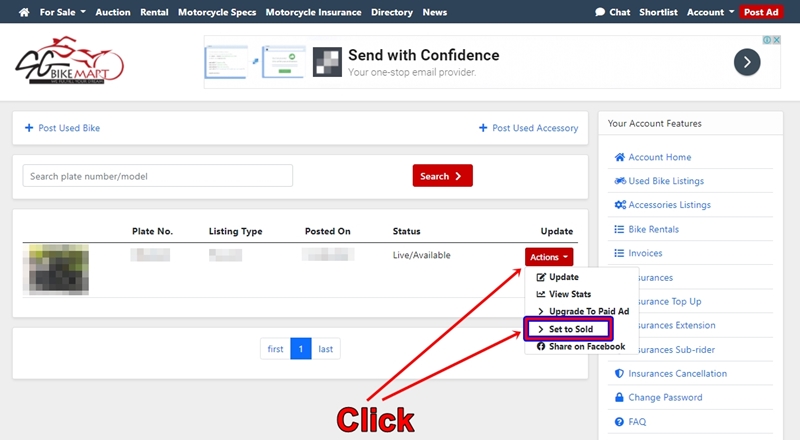
For Desktop, Go to your AD;
Click onto "Action" then select "Set to Sold".
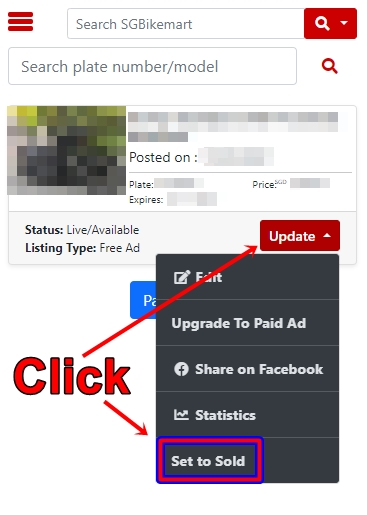
For App Or Mobile, Go to your AD;
Click onto "Update" then select "Set to Sold".
Do email in or call 6681 6778 regards to this issue. We will assist in resuming your Ad at no extra charges.
As the current number plate of the vehicle still exists in our database, to post the Ad fast, Post a Paid Ad will override the system.
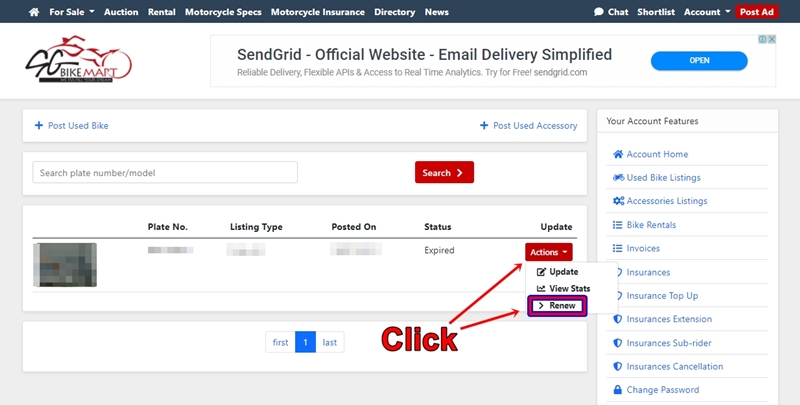
For Desktop, Go to your AD;
Click onto "Action" then select "Renew".
Proceed by fill up either your credit/debit card details and "Make Payment"
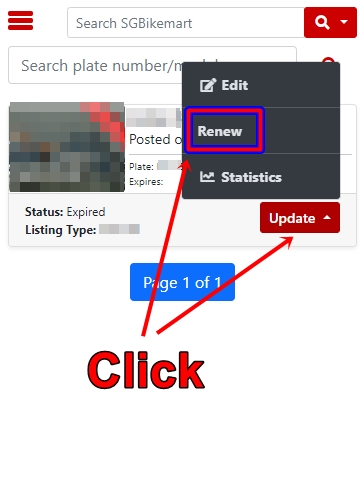
For App Or Mobile, Go to your AD;
Click onto "Update" then select "Renew".
Proceed by fill up either your credit/debit card details and "Make Payment"
If you had selected for "refresh" feature on the Ad, the Ad will be refresh back to the top listings of the day.
Do note that it does not have the priority of top placement. All newly paid listings will override your top listings position.
Once you and the buyer have agreed on the final selling price. Both of you should have an Agreement Form signed and deposit collected.
Buyer to purchase his own motor insurance and set a date to do a vehicle transfer at LTA. We would recommend you to set the vehicle to sold only when you have successfully transferred the ownership.
Features of the Paid Ad with an exclusive 24hrs top placement with your Ad highlighted for maximum exposure on top of all listings. Hot Ad will always be the recommended features if you wish to sell fast!
It's totally free! You can log in and edit as many times as you like it.
Paid Ad have more exposure & priorities on top of free Ads.
See the posting Ad chart here.
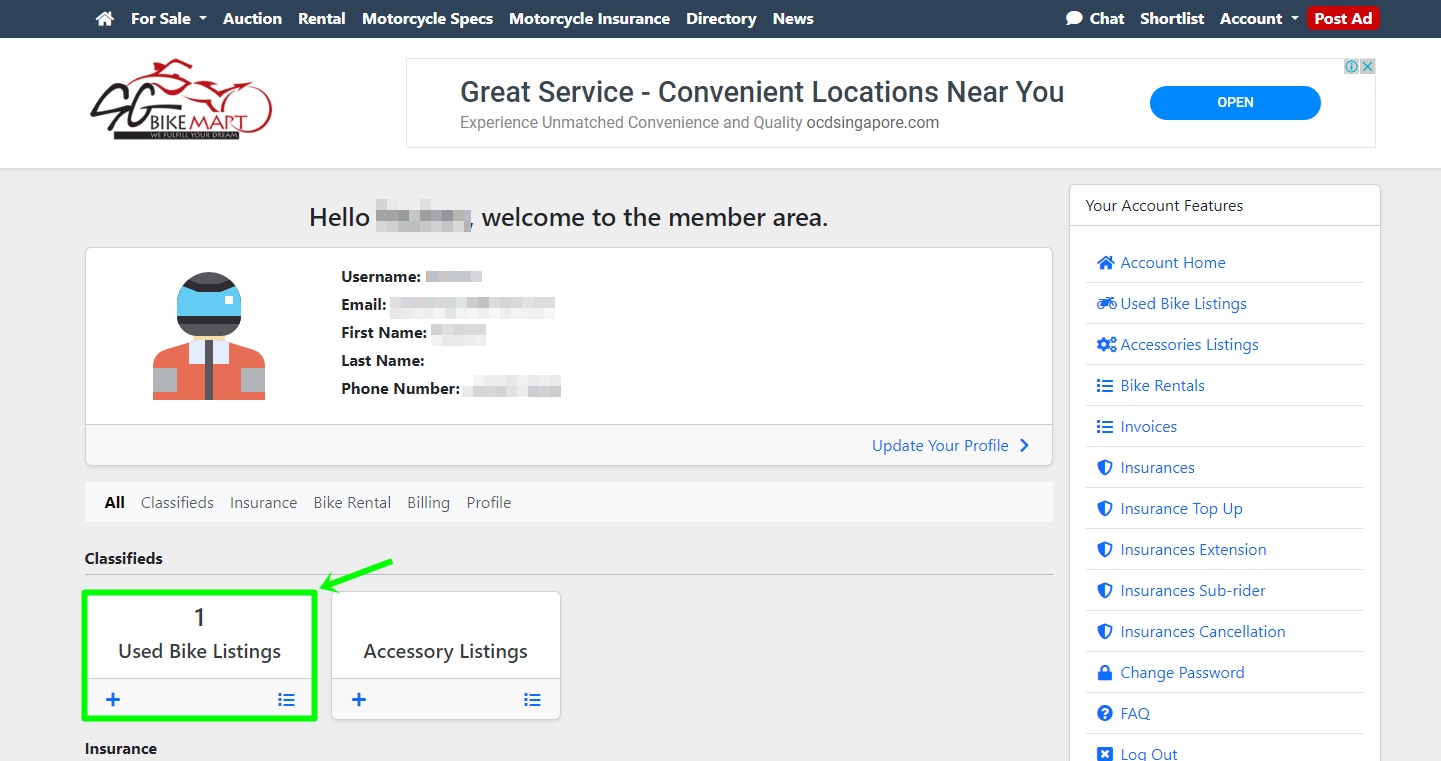
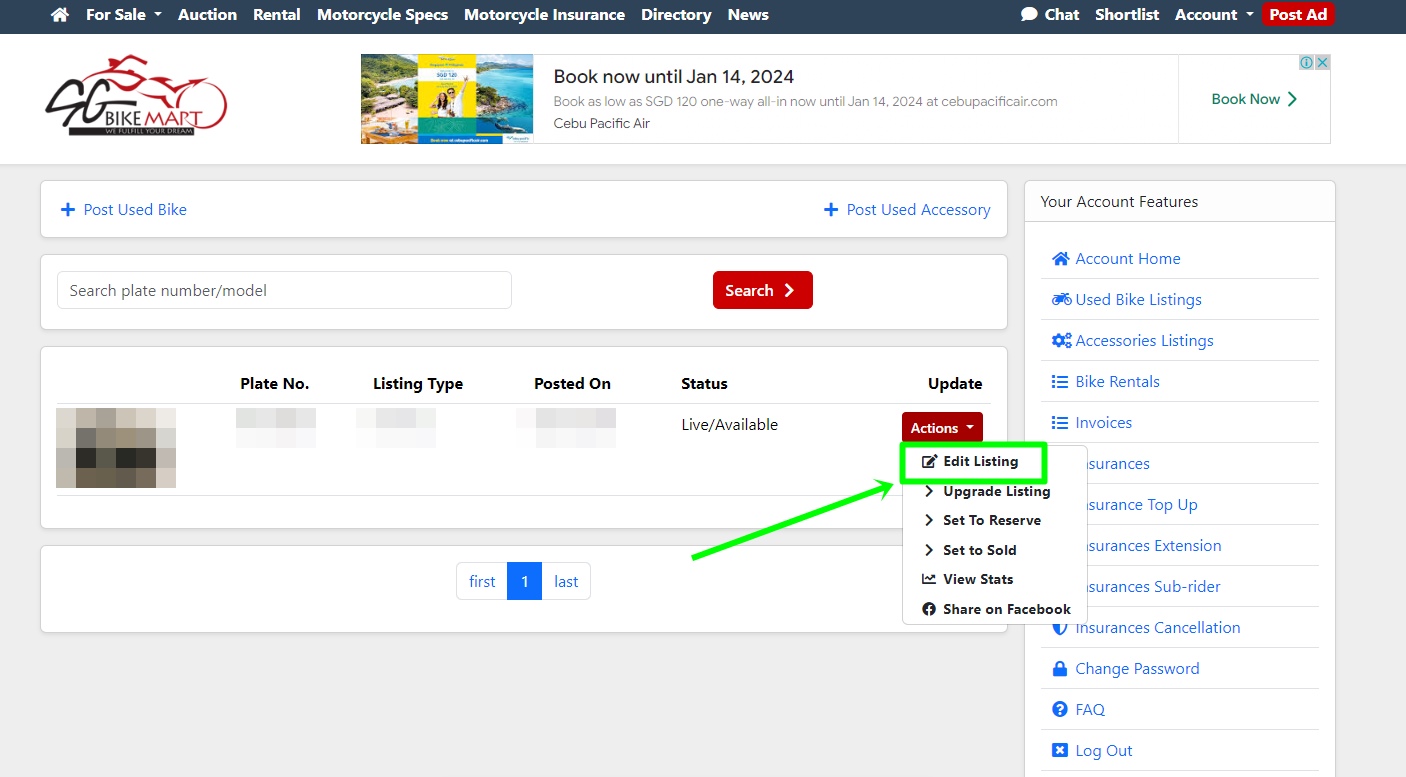
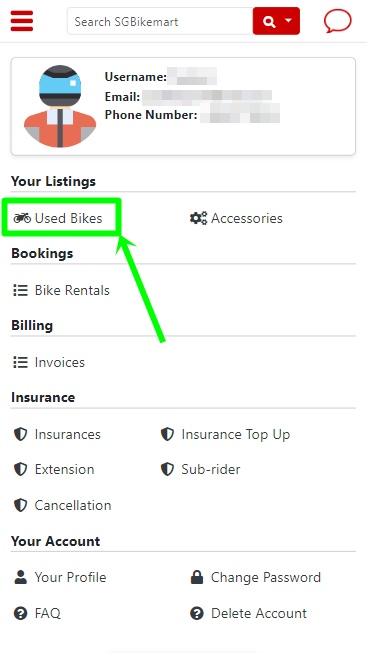
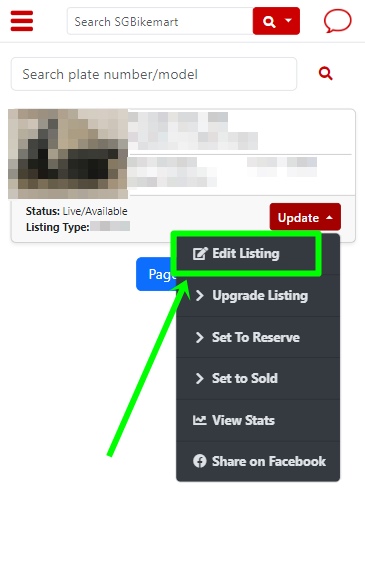
You can log in to your account. Find under "Used Bike Listings" or "Accessories Listings", look for your Ad. Click the "Action" / "Update" button and edit your changes, preview and submit.
Our admin will again vet through the Ad and approve accordingly.
Desktop
Mobile
Whether you are posting as a Free Ad or Paid Ad, once our Admin has vet through the Ad, it will take less than 8 working hours for your Ad to go live. For Ads posted after working hours or weekends. The duration might take up to 21 hours upon submission.
Once Ad has been posted live on our website, you will received an email on the approval posting.
All paid Ads will have the censorship number plate features to their photos.
All enquires from buyers will contact you directly either through private chat or the contact number you have stated in the Ad. SGbikemart, do not interfere with your negotiation or sale of the vehicle. We do not take any sale commissions if you advertise yourself.
The vehicle number plate & User ID you had input in our system will not be displayed on our site when the Ads goes live.
Its purpose is only for our admin to vet through with LTA and providing the correct details of the motor vehicle on our site.
For every Ads, Our Admin will vent through the Ad with LTA to make sure that the Ad is a genuine seller. We have feedback that there are lots of scams & unscrupulous buyer who post multiple similar Ads just sabotage the seller's Ad.
Our aim is always to provide the most accurate information to all interested buyers.
Many of our sellers who post on sgbikemart feedback that they received offers once their Ads have been posted.
Of course, subject to the selling price of the motorcycle. The more attractive the selling price, the faster you will be able to sell it.
Do email in or call 6681 6778 to register your interest. Our sales team will advise the most affordable package for multiple posting of Ads.
A search in google will tell you why we are popular. We have the largest database of used motorcycles available for sale since 2008.
We are strict with our quality control on our bike Ads that are posted on our site. We do not want scams to happen to those who buy or sell on our site.
Yes, we do! We provide a step by step transfer of ownership between the Buyer & Seller. This service is highly recommended to sellers & buyers to deal with a piece of mind. The transfer of ownership transactions will be our office.
Whatsapp chat with Us to book an appointment.
https://wa.me/6592787788
We are using Stripe payment gateway which all the big companies like Facebook, Shopify, Grab..etc are currently using.
SGbikemart is also using the SSL and will not receive any information on your credit card, as the payment process is handled solely by Stripe.
Do go under Motorcycle Insurance FAQ. You can find all the answer regards to all insurance matters.
Log in to your Onemotoring account using your Singpass, select 'Vehicle Hub' -> 'Enquire & print vehicle registration details' -> select the vehicle registration number of the required vehicle -> click Next and print the details accordingly.
Tokens are used on SGBikeMart to boost visibility and manage certain paid actions.
The usage logic is the same for all users, however token rates may differ between Dealers and Individual Users.
All applicable token usage and rates are shown clearly before confirmation.
Tokens are required for selected paid actions, including:
Refreshing a listing (Free listing & Paid Listing)
Boosting a listing (HotAd) [Paid Listing Only]
Auto-refresh features (where applicable)
Each action consumes a fixed number of tokens.
Yes.
The token usage logic is the same across all accounts.
However:
Token rates may differ between Dealers and Individual Users.
Rates are determined based on account type and active package (if any).
The system will always show the required tokens before you proceed.
You can view your token balance in:
Your Dashboard
The relevant action page (Refresh / HotAd / Auto Refresh)
Your balance is updated in real-time after each action.
Tokens are deducted only after you confirm an action.
No tokens will be deducted if:
You cancel before confirmation
The action fails due to a system issue
If your token balance is insufficient:
The action will be disabled
You will be prompted not enough tokens
Token expiry (if applicable) will be clearly stated at the time of purchase or allocation.
Please refer to your dashboard for expiry details.
Yes.
Before any token-based action is completed:
The required number of tokens is shown
You must confirm before proceeding
This ensures full transparency.
Token rates may be updated from time to time.
Any changes will:
Apply prospectively
Be reflected clearly in the system before confirmation